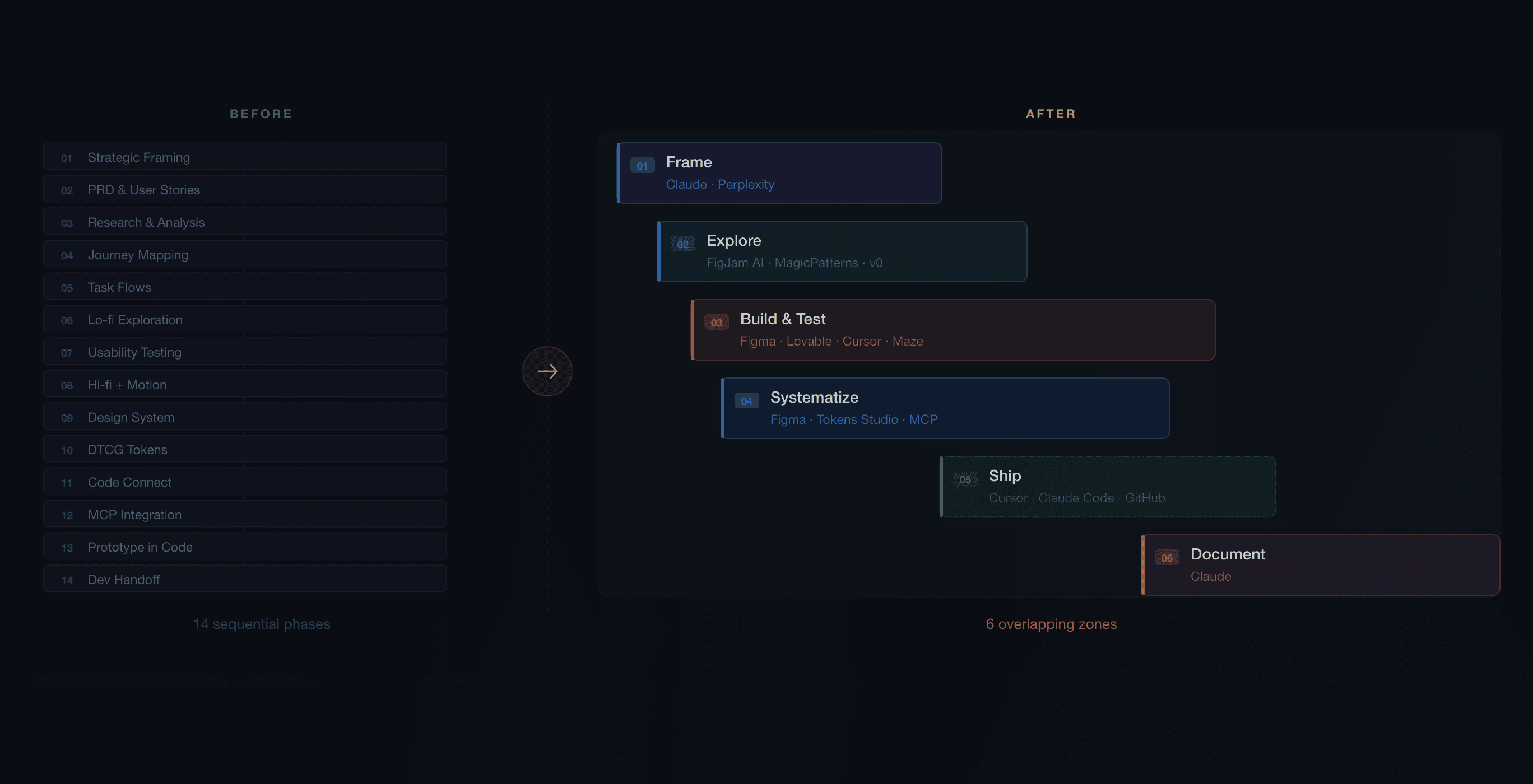
Before building a large SaaS product, I researched and validated the AI design process used by teams like Stripe, Linear, and Ramp. Through deep research and iteration, I synthesized a 14-phase waterfall into 6 overlapping zones: a teachable, tool-grounded framework built for speed, craft, and the design-to-code pipeline that modern teams actually use.
Context
The product design industry is in the middle of a significant shift. AI tools have become widely available and increasingly capable, but adoption patterns vary considerably. Many designers add AI to existing workflows as an enhancement layer, using it to summarize research, generate mood boards, or suggest layouts without changing the underlying structure of how work gets done. The result is faster execution of the same process, not a fundamentally different approach to product development.
Before starting a large SaaS design project, I wanted to understand how the teams doing the most technically ambitious design work were actually integrating AI into their design and development pipelines. Not how they described it in general terms, but what their actual toolchains, handoff processes, and design system requirements looked like in practice.
Solution
The research produced a framework that treats AI as connected infrastructure rather than a collection of point tools. The key finding was that the value of AI in a design workflow compounds when tools are connected: a research session feeds a PRD, which feeds lo-fi generation, which feeds hi-fi refinement, which feeds a design system structured so AI coding tools can read it directly. When any link in that chain is broken, downstream tools have to compensate with guesswork.
The framework organizes the process into 6 overlapping zones rather than sequential phases. Phases imply that one thing must be completed before the next begins. Zones acknowledge that build cycles, testing, and design system work happen concurrently in practice, and that the sequence is a guide for priority rather than a gate for permission.
Approach
The framework emerged from research conducted before beginning a design project. I reviewed published process documentation, interviews, and practitioner accounts from designers and design leaders at companies known for high-quality product design, then cross-referenced job postings to identify the skills and practices these companies were explicitly hiring for.
Key sources included published design process documentation from Stripe and Linear, Intercom's design team blog covering their vibe-coding hackathon, Figma's documentation on MCP server integration and Code Connect, the Design Tokens Community Group stable specification published in October 2025, and multiple practitioner accounts of AI-native design workflows published in 2025 and 2026.
The initial model was a 14-phase sequential process. Through research and validation, it became clear that this structure did not match how teams at the reference companies actually worked. They operated in overlapping activity zones where prototyping, testing, and design system work happened in parallel rather than in sequence.
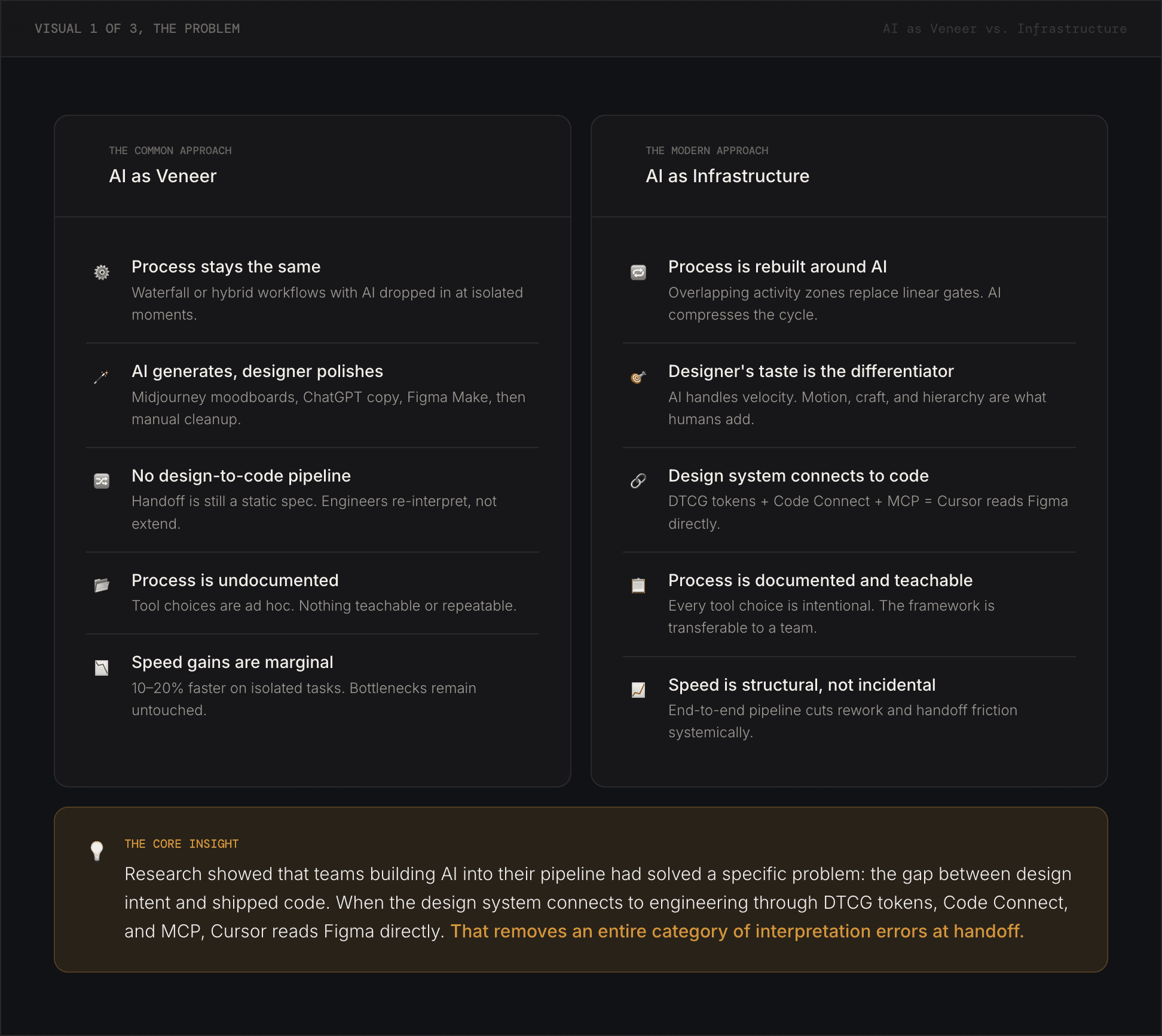
The clearest way to describe the difference is in terms of connectivity. When AI is used as a surface enhancement summarizing research, generating visual options, and suggesting copy, it operates in isolation. Each tool produces output that a person then carries forward manually. The process is augmented but not changed.
When AI is used as infrastructure, the connections between tools are automated. Research surfaces in the PRD. The PRD informs lo-fi generation. The design system's tokens are structured so AI coding tools can read them directly. Code generated from Figma designs references actual component names rather than approximations. The designer's judgment operates at a higher level since they are evaluating, steering, and refining rather than transcribing.
This distinction is most visible in the design system. A design system built primarily for designers uses components, spacing, and color scales that are visible and applicable in Figma. A design system built as AI infrastructure adds a layer of machine-readable structure: DTCG-compliant tokens exportable as JSON, Code Connect mappings that link Figma components to their code counterparts, and documentation structured so that AI agents can query it programmatically. The visual output may look identical. The difference is in what happens when an AI coding tool tries to implement the design.
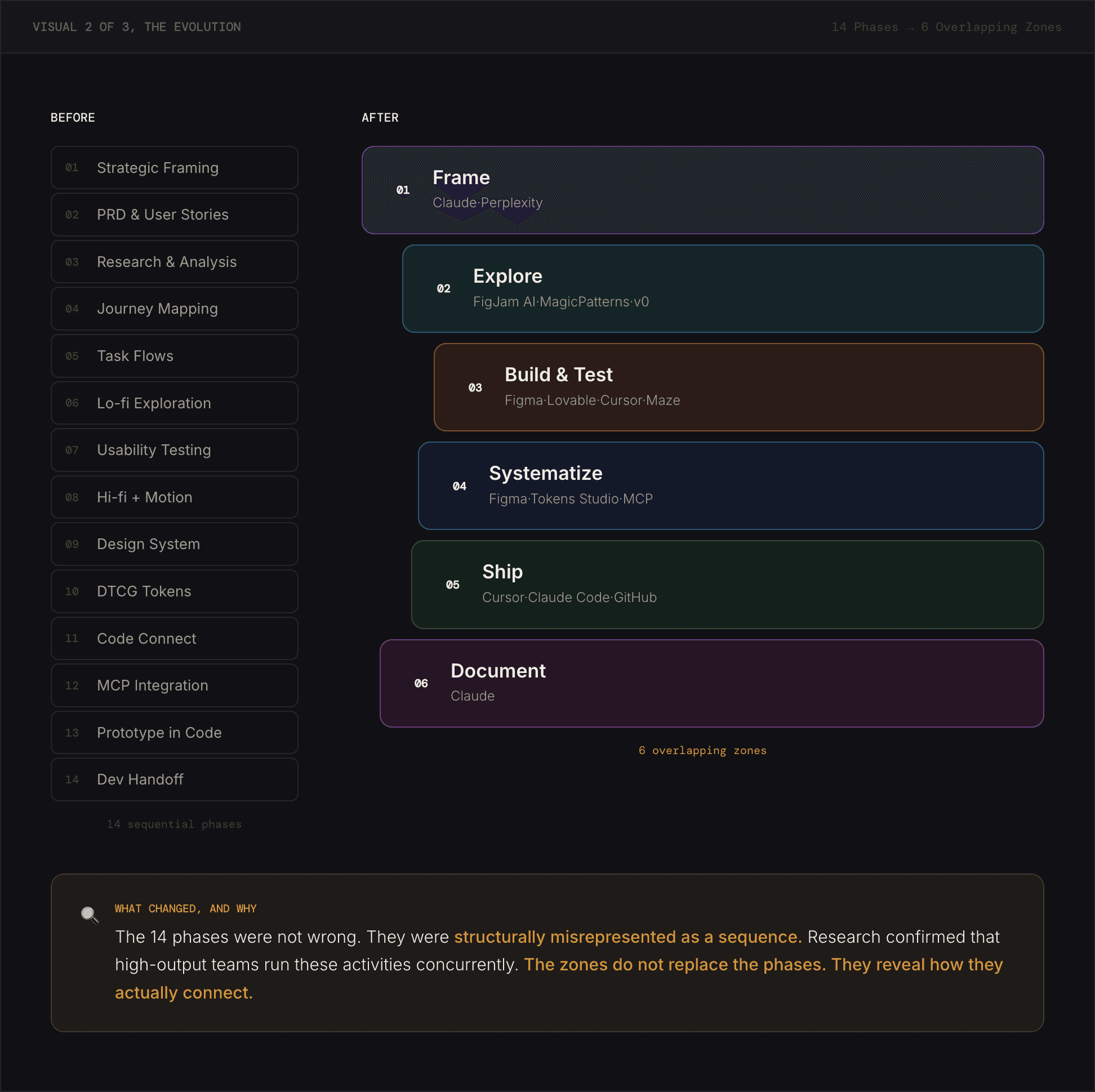
The original 14-phase model was built by mapping AI tools to each step of standard product design practice. It was comprehensive and sequential: research, then PRD, then journey mapping, then wireframes, then testing, then hi-fi design, and so on.
The problem was not with the activities since all 14 represent real work that needs to happen. The problem was the implied sequence. Published accounts from the reference companies described a different pattern: framing and research happening in a single AI-assisted session; lo-fi wireframes generated directly from a brief and tested with users before hi-fi began; design system work running in parallel with prototyping rather than after it.
The 6-zone model preserves all 14 activities but reorganizes them to reflect concurrent execution. Frame covers research, PRD, and strategic framing as a connected session. Explore covers journey mapping and lo-fi generation. Build and Test covers hi-fi design, code prototyping, and usability testing as a continuous loop. Systematize covers the design system infrastructure such as tokens, Code Connect, and MCP configuration which runs in parallel with Build and Test. Ship covers designer-authored frontend code, friction logging, and GitHub review. Document covers AI process documentation and portfolio presentation.
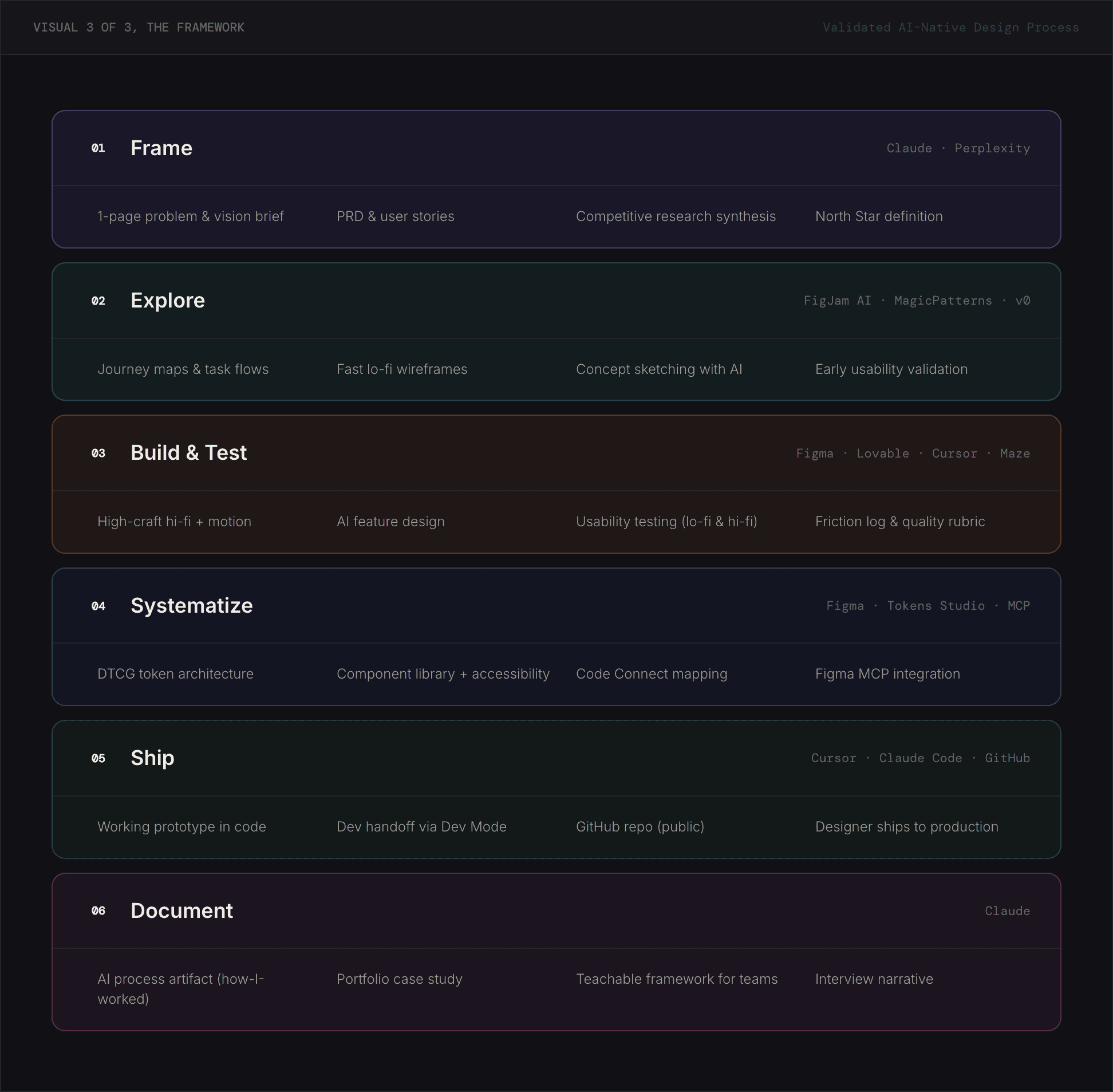
The framework is organized into six zones that overlap and run concurrently rather than sequentially. Each zone has a defined scope, a set of AI tools, and a concrete output. Together they cover the full product design lifecycle from initial framing through portfolio documentation.
Zone 1 — Frame. Research, PRD, and strategic framing happen in a single connected session using Claude and Perplexity. The goal is a 1-2 page brief that anchors every downstream decision. When this brief is grounded in real research, AI tools in later zones produce more accurate and relevant output because they have genuine context to work from.
Zone 2 — Explore. Journey maps, task flows, lo-fi wireframes, and AI feature behavior design happen in this zone. FigJam AI supports collaborative mapping. MagicPatterns, Figma Make, and v0 generate rapid wireframes directly from the brief. The sequence is not fixed, journey mapping and lo-fi generation often happen within the same working session.
Zone 3 — Build and Test. Hi-fi design with motion, code prototyping, and usability testing form a continuous loop rather than three separate phases. Figma handles high-fidelity design work. Lovable scaffolds the initial working prototype, Cursor refines it, and Maze facilitates testing. The loop repeats as often as the project requires.
Zone 4 — Systematize. The design system, DTCG-structured tokens, Code Connect configuration, and MCP setup are handled in this zone. It runs in parallel with Zone 3, not after it. This is the infrastructure layer that allows AI coding tools to read design intent directly rather than approximating it. Without this zone in place, the prototype code in Zone 3 operates independently of the design system which reintroduces the same translation errors the framework is designed to eliminate.
Zone 5 — Ship. The designer refines the prototype to production quality, runs a friction log against a defined quality rubric, and submits a GitHub pull request for engineering review. Cursor and Claude Code handle the refinement work. The friction log, a practice documented extensively at Stripe is a structured method for reviewing your own product as a user and scoring it against quality criteria before it reaches engineering.
Zone 6 — Document. AI process documentation and portfolio presentation. This zone produces an artifact that explains which tools were used at each zone, what decisions were made, and what a team would need to know to replicate or build on the approach. Documentation is the output that makes the process transferable rather than personal.
The relationship between zones 4 and 3 is worth emphasizing. MCP configuration in Zone 4 is what connects the design system to the coding environment in Zone 3. When the Figma MCP server is active and Code Connect is configured, Cursor can read component names, token values, and layout context directly from the Figma file rather than reconstructing them from a screenshot. The quality of the resulting code reflects the quality of the design system. A well-structured system produces accurate output. A loosely structured system produces generic output that requires manual correction.
The framework is being applied directly to an ongoing SaaS product. Each zone is producing concrete deliverables being documented in a separate case study as the project progresses.
The research resolved a practical question before the project began: whether to structure the work as a traditional process augmented with AI tools, or as a genuinely different approach.
Based on published practice at the reference companies, the answer was clearly the latter. The framework provides a starting point that can be adapted and taught to a team. A process that is explicit enough to be repeatable and flexible enough to accommodate how design work actually unfolds in practice.


© [UX Kitt]